AltaPass Breakthrough! WPA3 and 6 GHz Multiple-Password Support Using DecoyAuth
AltaPass Breakthrough! WPA3 and 6 GHz Multiple-Password Support Using DecoyAuth
We are proud to announce that DecoyAuth is now available on the Alta Labs AP7-Pro running firmware 3.0m or later. You can test the client side on Ubuntu via our hostap-decoyauth PPA, which also provides hostapd for Linux AP experiments. The goal is practical: authenticate users based solely on the Wi-Fi password entered; no usernames or password identifiers required.
This is an invitation to test an emerging protocol extension, with a goal that every Wi-Fi client will support it in the near-term. Both ends need DecoyAuth support to use the full password set. Here is why that matters, how to try it, and what the current evidence does and does not establish.
Why Restoring Multiple Passwords Matters
In an apartment building, a single network name should not mean a single password for all tenants. Multi-dwelling units, student housing, and other shared networks need credentials that can easily be issued and revoked per household or device. When a tenant leaves, the operator should be able to revoke that tenant’s access without revoking access for everyone else.
WPA2 deployments – still to this day – solve this with multiple pre-shared keys, often called MPSK or PPSK. Alta Labs has its own solution called AltaPass, with several enhancements to improve scalability. With these, vendors can accept several passwords on one SSID and associate the matching credential with a tenant policy, but it's based on 20+-year-old cryptography.
WPA3 arrived in 2018 with a worthwhile security improvement: SAE, a password-authenticated key exchange designed to resist passive offline password guessing. But the transition did not preserve that familiar identifier-free, multi-password workflow. An AP cannot simply reuse WPA2’s method of trying candidate keys against the four-way handshake. The password participates earlier, inside SAE.
That is the practical regression the Wi-Fi industry has needed to fix since 2018. More precisely, the Wi-Fi Alliance’s WPA3 rollout, using IEEE-defined SAE, left this deployment model behind. It did not make every form of multi-user authentication impossible: WPA3-Enterprise remains an option, and SAE password identifiers can distinguish passwords when clients support and provision them. Neither is a drop-in replacement for asking a resident to enter only their own password. See Mathy Vanhoef's PAKE presentation for more info: Mathy Vanhoef’s PAKE workshop presentation
The move to 6 GHz made the gap harder to avoid. Password-protected personal networks in that band are required to use WPA3-SAE, rather than WPA2-PSK or WPA2/WPA3 transition mode. Operators simply cannot carry a legacy WPA2 multi-password design into 6 GHz.
The Research Behind DecoyAuth
An NGI Sargasso grant supported the DecoyAuth research collaboration between KU Leuven and Alta Labs. Alta Labs also sponsored Mathy Vanhoef’s work on the cryptographic basis for this project. That collaboration brought the operational problem to a researcher who could address the authentication protocol itself, rather than disguise a WPA2 fallback as a WPA3 solution. Project details are here: NGI Sargasso project profile
Vanhoef’s design builds on Dragonfly and oblivious password-authenticated key exchange (O-PAKE) techniques. The AP encodes password-dependent handshake responses; a client uses its password to recover the appropriate response and complete authentication. The AP checks the confirmation against its candidates to identify the accepted credential. It does not broadcast a list of plaintext passwords, or even hashes of passwords. This allows a network to associate the authenticated password with a tenant policy. The whitepaper is found here: Protocol whitepaper, and the integration specification is here: Wi-Fi integration specification
The name comes from the research goal of detecting the use of decoy credentials. While this can be used for detecting compromised credentials through a honeypot, it can also be the basis for authenticating solely based on password entered. The research code and papers are public so implementers and cryptographers can examine the design: DecoyAuth research repository
What We Changed From the Research Implementation
Mathy Vanhoef’s original hostap implementation supplied the starting point for bringing the cryptographic design to Wi-Fi. Our implementation builds on that work with changes to password-element derivation, the over-the-air exchange, deployment policy and operational integration. These are implementation extensions, not a claim to have invented the underlying DecoyAuth construction.
H2E replaces hunting and pecking for DecoyAuth. The original multi-password preparation allowed SAE’s hunting-and-pecking (HnP) method. We have deprecated that path for DecoyAuth and require hash-to-element (H2E) instead, aligning it with the SAE method required for WPA3-Personal in 6 GHz. This does not remove HnP from ordinary SAE: optional mode can still fall back to standard SAE where the network permits it, but that fallback does not provide DecoyAuth’s multi-password capability.
A new fragmented exchange supports hundreds of passwords. The original code serialized the password-dependent polynomial coefficients directly into one AP SAE Commit response. That payload grows with the password count and cannot fit in a single Wi-Fi management frame at large counts. We added a request/response sequence that divides oversized payloads into numbered fragments carried in vendor-specific information elements within SAE Authentication frames. The station requests successive fragments, validates and reassembles them, and then completes the SAE Commit and Confirm exchange. These are Authentication frames, not Action frames; a small payload still fits in the Commit response without the extra fragment exchange. This transport is what allows us to test a configured set of 512 passwords rather than being limited by one frame’s capacity.
Explicit capability negotiation and fallback policy. We added disabled, optional and required modes, with optional as the default. The station signals DecoyAuth support so the AP can select the appropriate exchange. A legacy station can use the first matching password through ordinary SAE in optional mode; required mode rejects SAE attempts that do not negotiate DecoyAuth. Both AP and station need the updated implementation to use the extended exchange.
Integration beyond the handshake. We added interpolation-matrix caching and background preparation for larger password sets, along with bounded payload parsing and fragment reassembly. We also added support for MLO and FT-SAE operations. The tests below exercise these deployment behaviors, not just the cryptographic demonstration.
All of these changes have been submitted for review to the open-source hostap project for inclusion into the most popular Wi-Fi supplicant, used by billions of devices worldwide.
How to Install and Test DecoyAuth
Use an AP7-Pro on firmware 3.0m or later and a Linux client running the patched wpasupplicant. Create a dedicated test SSID with at least two distinct passwords using the AP’s multi-password configuration. Set WPA3 to required on the target SSID.
Install the Ubuntu Packages
Do this from a local console or with a wired recovery connection. These packages replace system Wi-Fi software, and installation or rebooting may interrupt connectivity. Do not make your only remote access path the network you are modifying.
sudo apt update
sudo apt install software-properties-common
sudo add-apt-repository ppa:sqrammi/hostap-decoyauth
sudo apt update
apt-cache policy wpasupplicant hostapd
sudo apt install wpasupplicant
Check that the candidate and installed version come from the PPA and include +decoyauth. Install hostapd if you also want to test a Linux machine as an AP:
sudo apt install hostapd
dpkg-query -W wpasupplicant hostapd
Reboot the test client when convenient so it is definitely running the new supplicant, not a previously loaded process. If hostapd is not installed, the dpkg-query command will report that package as missing; the client test needs only wpasupplicant.
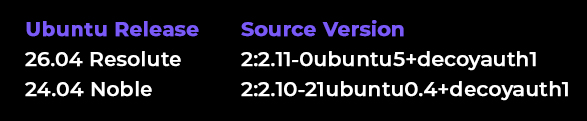
Package publication snapshot on 11 September 2026: the same PPA carries separate source versions for Ubuntu 24 Noble and Ubuntu 26 Resolute. See PPA package listing
Connect with Passwords A and B
With NetworkManager using the updated wpa_supplicant backend, the normal SSID-and-password workflow will automatically use DecoyAuth, if the AP supports it.
Try connecting with password A, then password B. If you configured each password to connect using a different VLAN, notice that your subnet will change with each password entered.
If you'd like to manually test, ensure that there is no NetworkManager nor any other process handling your WiFi interface, then use a config similar to this:
ctrl_interface=/run/wpa_supplicant
sae_pwe=1
network={
ssid="DecoyAuth-Test"
key_mgmt=SAE
ieee80211w=2
psk="passwordB"
decoyauth=2
}
sudo wpa_supplicant -Dnl80211 -i wlan0 \
-c /path/to/decoyauth-test.conf -d
This foreground command performs Wi-Fi authentication and association; it does not configure DHCP, routing or DNS. Stop it with Ctrl+C and restore the interface to its usual manager when finished.
Test Linux AP Mode if Desired
The hostapd package enables a second test path: a Linux AP with a supported adapter. An Intel iwlwifi device may support a 2.4 GHz AP, but this depends on the exact chipset, firmware and driver. Check the supported interface modes with iw list. An Intel brand name is not a compatibility result. Use a dedicated interface that is not simultaneously managed by NetworkManager or another AP daemon.
For an authentication-only lab, a hostapd configuration can look like this. Replace the interface, credentials and channel as needed, and obey the local regulatory domain:
interface=wlan0
driver=nl80211
ssid=DecoyAuth-Test
hw_mode=g
channel=1
wpa=2
wpa_key_mgmt=SAE
rsn_pairwise=CCMP
ieee80211w=2
sae_pwe=1
decoyauth=2
sae_password=replace-with-password-A
sae_password=replace-with-password-B
Then run this config with:
sudo hostapd -d /path/to/hostapd-decoyauth.conf
This is not a complete Internet-sharing configuration. Bridging or routing, DHCP and firewall policy must be supplied separately.
What the Testing Establishes So Far
Our automated DecoyAuth WiFi tests focus on what happens on the network: which passwords grant access, which VLAN a client receives, and whether that identity survives reconnection, multiple links and roaming. The suite exercises these behaviors with MLO enabled and disabled where applicable.
Rejecting an unlisted password. A password that is not in the configured list must fail SAE authentication, never reach the connected state, and leave no authorized password identity on the AP. The test then connects with a valid password and checks that normal access recovers after the rejection.
Different passwords select different VLANs. The suite connects with four configured passwords assigned alternately to VLAN 1 and VLAN 2. It checks the selected password identity on the AP, the client’s expected IP subnet, gateway reachability and routed traffic. This verifies that password A and password B can grant access to different networks on the same SSID, rather than merely allowing both clients to associate.
A configured set of 512 passwords. The scale test loads 512 distinct passwords, assigns them alternately to VLAN 1 and VLAN 2, and connects with four randomly sampled entries. Each sampled connection must receive the correct VLAN and password identity..
About 10 seconds for the first connection. In our AP7-Pro testing with 512 passwords, the first connection takes about 10 seconds while the AP prepares the interpolation data. The suite also checks that subsequent connections reuse the AP’s matrix-cache file instead of rebuilding it, and records cold and warm computation timings when the logs provide them. That roughly 10-second result is an observed first-connection time, not a fixed delay for every connection or a guarantee across all hardware and radio conditions. Matrix-caching brings connection time down to 1-2 seconds, and FT brings roaming time to sub-100 ms as expected.
PMKSA caching and reconnects. After authenticating with a non-primary password assigned to VLAN 2, the test checks that a PMKSA entry exists and that the supplicant attempts to reuse it during reassociation. It verifies that the password identity and VLAN remain correct, then reprovisions the AP’s SSID and checks that reconnecting still restores the same policy and network access. PMKSA caching and the AP’s interpolation cache are separate mechanisms: one caches authentication key material, while the other avoids repeating password-set preparation.
MLO policy consistency and link recovery. With MLO enabled, the suite checks that at least two active links agree on the authenticated password identity and VLAN. It dynamically removes a non-association AP link and checks that VLAN 2 gateway access survives. After restoring the AP links and reassociating, it verifies that the same password identity, VLAN and routed access are retained.
Fast Transition roaming. The FT test starts with DecoyAuth authentication, then performs an over-the-air FT-SAE roam between two APs. It checks successful FT completion at the client and target AP, preserves the password identity and VLAN 2 access, and checks the logs to ensure that neither side repeats the DecoyAuth exchange or its AP preparation during the roam. In the MLO test leg, it also verifies that the station’s local link addresses remain consistent.
Kernel prerequisite for FT roaming with MLO. On affected Linux kernels, testing Fast Transition together with MLO also requires a mac80211 fix that preserves the station’s link MAC addresses during roaming. Without it, the AP can reject reassociation because those addresses no longer match the FT integrity check. Installing our hostapd and wpasupplicant PPA packages alone does not install this kernel fix. This is separate from DecoyAuth itself and is not a general requirement for basic multi-password testing.
Download the mac80211 FT/MLO patch. We plan to submit this patch to the upstream Linux kernel project.
Password changes and compatibility. Additional cases reverse the password list without changing the selected password’s identity or VLAN, rotate a password so that the old value is rejected and the new one retains its VLAN policy, and test optional-mode compatibility. A client with DecoyAuth disabled can use the primary password but not the secondary one; enabling DecoyAuth lets it use that same secondary password. The non-MLO PWE tests also check H2E operation, rejection of hunting-and-pecking SAE when DecoyAuth is required, and standard SAE fallback when it is optional.
We Want Your Feedback!
Please post on our forum (forum.alta.inc), and even social media, if your testing is successful! Getting to this point has already taken several years, so it may take some time before major client vendors also support this feature. The more buzz around solving the problem, the better!
A useful test demonstrates a complete SAE exchange using something other than the first configured password. In a fresh authentication, look for the DecoyAuth value-processing messages in the client log and successful connection completion. Cached PMK or fast-transition reconnections may skip a fresh SAE exchange, so clear cached state or use a fresh test profile when checking negotiation.
- Try each valid password, then an unconfigured password. Valid credentials should connect; the unconfigured one should fail. Verify the negotiated authentication method is SAE and that the non-fallback test actually used DecoyAuth.
- Increase password counts and repeat cold and warm connections. Larger encoded payloads use additional authentication-frame fragments in this implementation.
- Test each band separately, then MLO and roaming on supported builds. Verify IP connectivity and the intended VLAN, and actively check that one tenant cannot reach another tenant’s protected network.
- Report AP model and firmware, Ubuntu release and package version, client chipset, kernel and driver, band, channel, password count, policy mode, attempts, successes and failure symptoms.
Keep a wired recovery path. To return installed packages to the Ubuntu archive versions, use ppa-purge from that recovery connection and review the proposed changes before approving them:
sudo apt install ppa-purge
sudo ppa-purge ppa:sqrammi/hostap-decoyauth
Simply removing the PPA does not downgrade packages already installed from it. After rollback, restart the relevant services or reboot to load the restored binaries.
Password Identifiers Do Not Restore Password-Only Wi-Fi
SAE password identifiers let an AP select among multiple passwords, but require the client to supply an additional identifier – effectively a username. Without automated provisioning, a tenant must enter both an identifier and a password. QR codes can package those together, but the extra provisioning requirement remains, and there's no backwards compatibility for existing WPA2-PSK configurations. That changes the familiar MDU move-in experience: choose the network and enter your password.
The 802.11bi identifier-rotation mechanism improves privacy on subsequent connections, but does not automatically protect the first. In the current hostap implementation, a client without preprovisioned encrypted aliases sends its original identifier in cleartext before authenticating the AP. Later aliases conceal that identifier, but repeated aliases remain recognizable. The implementation also discards aliases following unauthenticated rejection messages and falls back to the original identifier when none remain – a potential route for a rogue AP to expose it again.
The space allocated for password identifiers is also incredibly small, only allowing for about 5 identifiers, a far cry from the 512 passwords that this DecoyAuth implementation allows.
These mechanisms can support multiple passwords, but they do not deliver the identifier-free workflow we set out to restore. DecoyAuth lets the password itself select the appropriate access policy, without requiring a separate identifier to be entered, provisioned, or transmitted.
Quantum Risk is Not a Reason to Leave This Broken
Neither DragonFly's nor DecoyAuth’s present elliptic-curve design is post-quantum secure. We should say that plainly. A sufficiently capable quantum computer would threaten its underlying assumptions, just as it would threaten other widely deployed classic public-key systems.
But “not post-quantum” is not a reason to ignore a real access-management problem introduced by the WPA3 transition in 2018 and intensified by 6 GHz. "Q-Day" has no reliable date. Tenants and operators need workable credential separation in the meantime. NIST on post-quantum cryptography
Even if Q-Day is close, abandoning multi-password usability is not the answer. We should improve today’s system while developing and deploying a reviewed post-quantum successor that preserves this capability.
Try the PPA yourself, challenge the implementation, and share reproducible results. Restoring practical multi-password Wi-Fi while preparing for quantum-safe authentication are both necessary work.